Browser extension for side-by-side Dynamics 365 entity comparisons
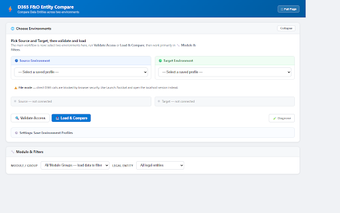
D365 Entity Compare, created by Hai Nguyen at Axatoz, is a Chrome extension for Microsoft Dynamics 365 Finance & Operations teams that validates environment consistency. The extension performs side-by-side comparisons of Data Entity inventories and OData records by using active browser sessions to access source and target instances. Key capabilities include module grouping, record-level comparison, and exportable HTML reports for audit trails. Functional consultants and implementation teams get a browser-based way to confirm post-deployment configurations without handling API tokens or scripts.
What practical validation tasks does the extension address?
The extension targets environment checks such as sandbox-versus-production validation and post-deployment verification, using the browser as the execution surface. By reading Data Entity listings it helps users identify entities present in one instance but missing in another, and it organizes results by D365 application modules like Finance, Supply Chain, and HR, which simplifies focused reviews for functional teams and reduces manual cataloging work.
How deep are its comparison and export capabilities?
The tool supports two levels of comparison, moving beyond simple inventories to record-level validation. It can surface differences in OData records and produce a self-contained HTML report suitable for audit trails. Key outputs include:
- entity existence mapping between source and target,
- record-value diffs at the OData level,
- exportable HTML reports for documentation.
Does it protect sensitive data and avoid external authentication?
The extension processes comparisons inside the user's browser and uses active authenticated sessions rather than separate API tokens, so there is no external transmission for analytics or tracking. This privacy-first approach keeps data local to the browser and eliminates the need for external credential management or setup scripts, which reduces operational overhead for auditors and consultants who prefer client-side tools.
Who benefits and how does it fit existing D365 workflows?
Functional consultants, solution architects, and implementation teams gain value when they need rapid verification without scripting or service accounts. The extension runs in Chrome and other Chromium-based browsers, fitting into typical desktop workflows where users already sign in to D365 instances. Axatoz positions the tool as a lightweight companion for manual validation steps during deployments and audits rather than an automation platform for CI pipelines.
Practical choice for manual validation, with clear workflow trade-offs
The extension is a practical option for D365 Finance & Operations practitioners who perform manual environment checks and require audit-ready output. It reduces setup friction for interactive inspections, but it depends on live authenticated sessions and Chromium compatibility, which makes it less suitable for automated, headless, or non‑Chromium deployment workflows. Teams should match the tool to inspection tasks rather than replace automated validation pipelines.